
The eSign app includes and automatically populates read-only fields for Jira work items. These can be used to enhance search and filter capabilities to locate Jira issues with signatures and display within search results. Enable these fields within Jira Issue Configuration - Custom Fields, and then add to appropriate screens.
These custom fields can also be included Jira filters, exports (to Microsoft Word and XML), and third party apps like Xporter.
For more search examples, see Advanced Issue Search
Custom Fields
|
Custom Field |
Example |
Description |
|---|---|---|
|
Signature Count |
3 |
Count of signatures on this issue |
|
Signature Pending |
2 |
Count of pending signatures (open invites) on this issue. |
|
Signature Export |
<see below>
|
Summary of all signatures with name, title, date/time and meaning.
|
|
Signed By |
John Hancock, James Smith, Winston Churchill |
List of signee names |
|
Signed On |
Jan 15, 2020 3:15 PM |
Date/time of most recent signature |
|
eSignPendingUsers (index) |
|
JQL searchable index that can be added to Jira JQL search filters. This example returns issues where the current user is invited to sign. Note this field is not renderable by Jira and can not be added to the search display results. |
If these search fields are not available in the Jira JQL search window you may need to register them for the current project. There are two ways to do this:
-
Open the eSign Signature (Space) Settings page and press Save. This will re-register all eSign custom fields for the current project. providing that the eSign fields have been added to at least one project in the site previously.
-
Add the fields manually in Site Settings > Fields. See Signature Search Fields Don't Exist
Custom Field - Signature Export Example
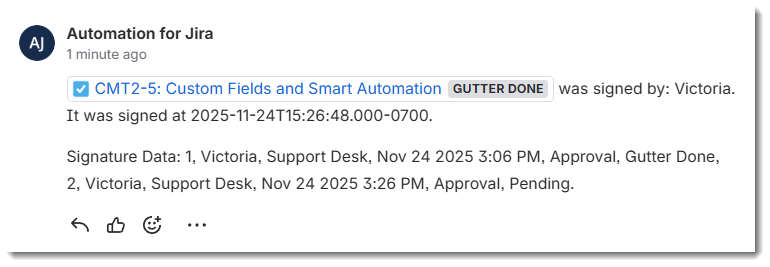
1, John Hancock, Historical Figure, Jan 15 2020 3:15 PM, Author, Review,
2, James Smith, Historical Figure, Jan 16 2020 11:35 AM, Approval, Review,
3, Winston Churchill, Prime Minister, Jan 16 2020 11:36 AM, Approval, Final Review,
Atlassian Automation Integration
Extract eSign Custom Fields with Smart Values
You are able to use Jira Smart Values to retrieve data from the eSign custom (issue) fields. Any automation rule with an issue/work item in context can access values. This is also useful in rules triggered from eSign Webhook Events.
|
eSign Custom Field |
Smart Value Syntax |
|---|---|
|
Signature Count |
{{issue.Signature Count}} |
|
Signature Pending |
{{issue.Signature Pending}} |
|
Signature Export |
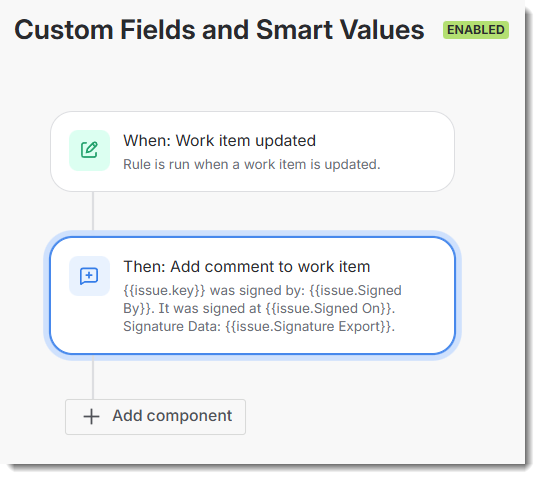
{{issue.Signature Export}} |
|
Signed By |
{{issue.Signed By}} |
|
Signed On |
{{issue.Signed On}} |
|
eSignPendingUsers |
{{issue.eSignPendingUsers}} |
Automation Rule with Smart Value Example
Automation rules can be set up as follows, resulting in a comment like this:
Extract Signature Metadata with Automation Smart Values
It is also possible to use Automation Smart Values to extract information from the signature metadata stored as issue entity property “esign.digitalrose.dev”.
This is a more advanced topic that will require some technical expertise to implement. Refer to https://support.atlassian.com/cloud-automation/docs/smart-values-in-jira-automation/ for a technical guide.
Download samples of the signature metadata (.json) from the Signatures Panel > […] > Signature Admin dialog on any issue with signatures.
Note that the signature metadata stored in the “esign.digitalrose.dev” issue property is internal application data. Fields may change without notice.
|
Signature Metadata - Automation Smart Value Examples |
|---|
|
Extract All signature metadata. This may be useful for initial development and to confirm the issue has some signature data. |
|
Iterate through executed signatures |
|
Filter and display only a signature name, date and time matching “QA Approval” meaning |
External App Integrations
Exporting via Xporter
In general is is possible to include eSign custom fields in an Xporter templates. For example: ${Signature Export} or ${Signed By}.
For information on adding custom fields like “Signature Export” to X porter templates, see documentation here: Custom Field Mappings - Xporter Documentation