
Subscribe to receive notifications of upcoming eSign releases and important updates.
2025-12 - Training Instructions, Working Copy Naming, Unique Reviewers and more
eSign Documents upgraded to the Connect on Forge Platform Dec 31, 2025. There were no feature changes.
This update has been released. Rollout to all sites was completed .
|
|
Description |
||||||
|---|---|---|---|---|---|---|---|
|
FEATURE |
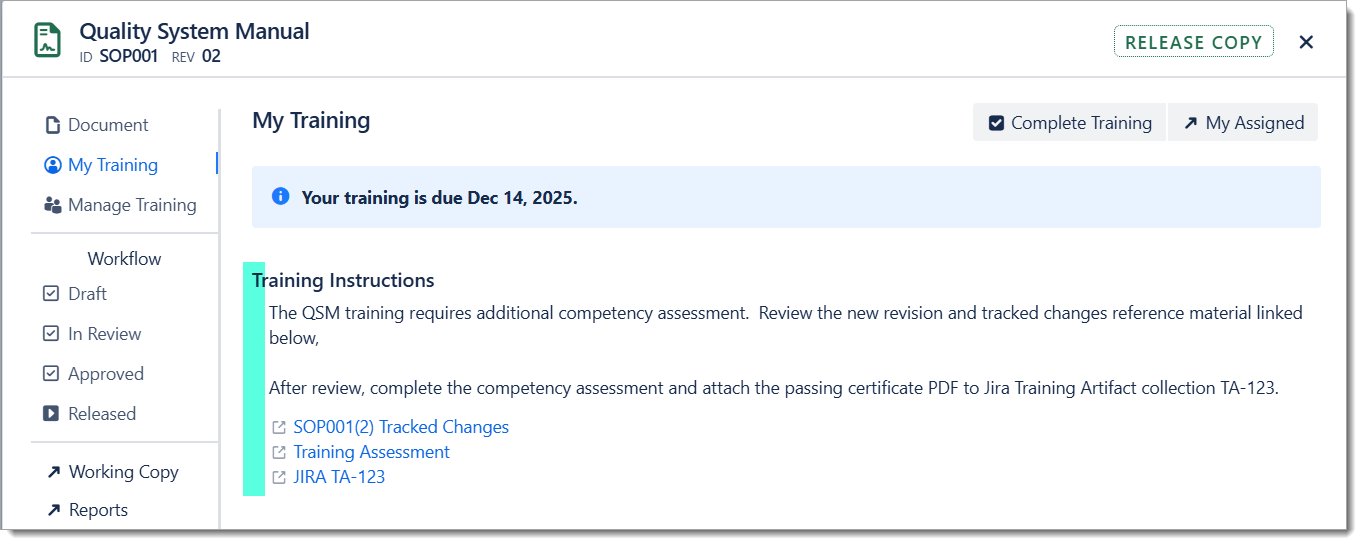
Training Instructions - It is now possible to author customized training instructions for managed documents. These instructions can provide targeted guidance for trainees on the steps to take during document training. The instructions can include up to 3 links to training related resources. These links could be used to:
Notes
|
||||||
|
FEATURE |
Periodic Review Reminders - eSign will now send email notifications for released documents with Periodic Reviews due. The emails are sent as a weekly digest to each Document Owner with periodic reviews in due in the next 30 days. The Periodic Review report (under App > eSign Reports) can be accessed at any time to view the complete periodic review schedule. |
||||||
|
FEATURE |
Require Unique Reviewers - Document Types can now be configured to require unique reviewers. When enabled, each Approval for those documents requires a separate person. i.e. The same person cannot sign for multiple roles. Enable this setting in the Document Types configuration table. It will take effect on the Start of a new revision workflow. 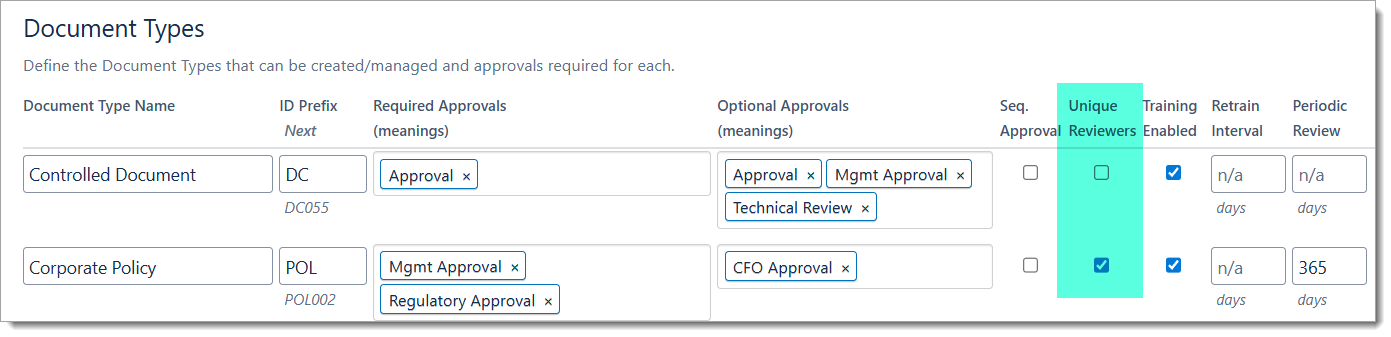
|
||||||
|
ImproveD |
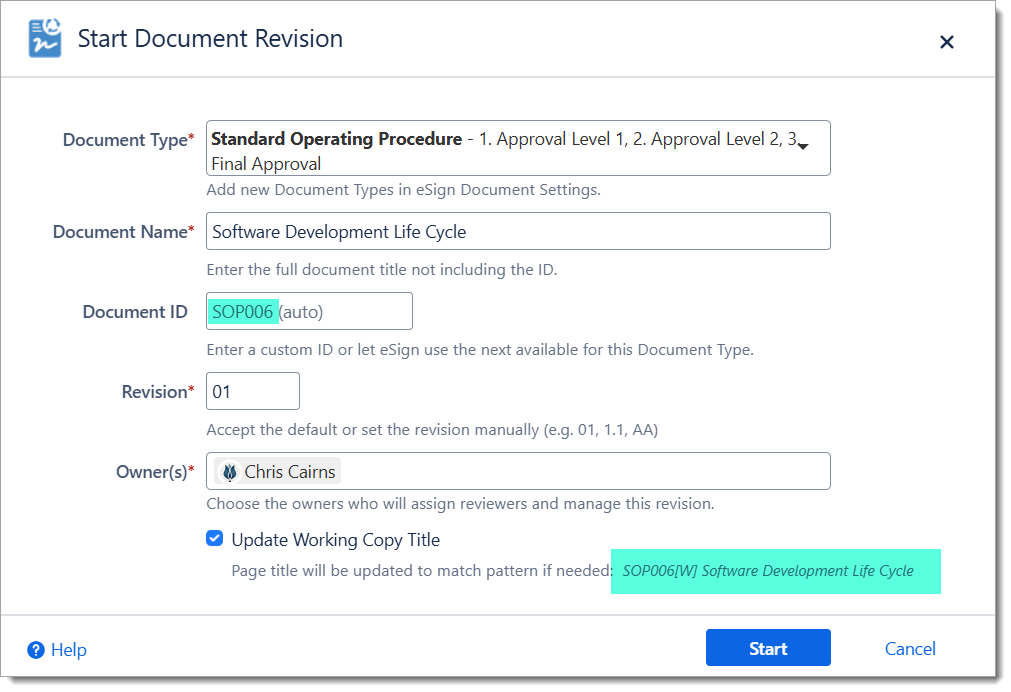
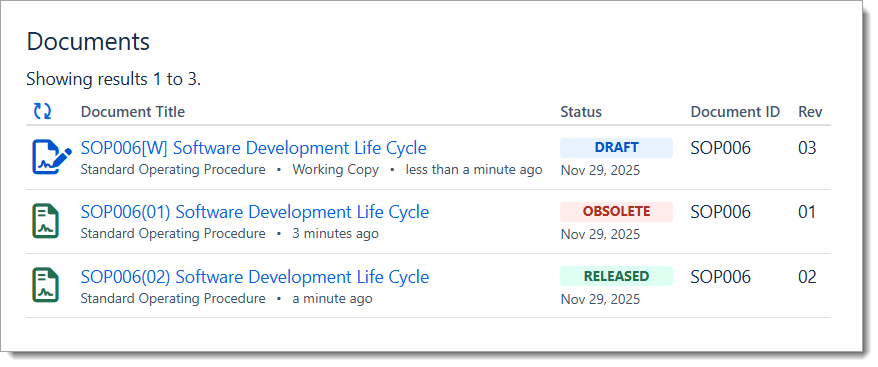
Working Copy Management Improvements Working Copy Title Update: Many customers are already adding the Document ID to the working copy page titles for easier tracking and identification of controlled documents. eSign can now do this renaming automatically as part of the Document Start stage. The page title will be renamed to [ Document Name ] [ Document ID ][W] aligned with the Page Title Pattern (Prefix or Suffix) setting in Space Settings. For example, with a new Document assigned ID PR007 renamed as follows :
Note: The automatic rename can be opted out via a checkbox on the Start Document dialog. Document Owners can continue to edit the Working Copy page title manually if needed. Version History Tagging: On Start of a document revision workflow, eSign will add a tagged history entry in the Confluence page version history. This will make it easier to track which page in the version history is linked to which document revision. eSign as Page Owner: The eSign app will also become the Confluence page owner of working copies on Start. This changes is to address a security “feature” in Confluence where page owners can bypass page restrictions in certain situations. There is no change to eSign Document Owners; these users are still assigned on start to manage the document through the review and approval process. |
||||||
|
ImproveD |
Optional Training Activation - For Documents that do not need it, Training can now be deactivated in Document Type configuration. This will simplify the release steps and automatically hide the My Training and Manage Training tabs after release. Training remains enabled by default on all existing Document Types. Administrators can continue to activate or deactivate training on released documents as required. |
||||||
|
ImproveD |
Webhook Events Extended - Three new events have been added for integration with Atlassian automation rules:
Customers can use these events to trigger automation business rules for advanced notification and custom data handling. See the Space Settings page for more details. |
||||||
|
UX |
The Start Document dialog will now show a preview of the next automatic Document ID that would be assigned to this document. It also shows a preview of the rename title. Note that eSign will use the next available ID when the document is started, which may not be the same as the preview ID. |
||||||
|
UX |
The email notification on Working Copy final approval has been improved to let users know that that the document is ready for release. |
||||||
|
ImproveD |
The Document Training Record report now includes the Assigned Date of training in addition to the Completed Date. |
||||||
|
UX |
The Document Management and Start dialogs are now larger to help show additional content (e.g. Training Instructions). They also received some minor field layout tweaks. |
||||||
|
UX |
The View Document Metadata page now supports dark theme. |
||||||
|
TECH |
The Review reminder and training reminder emails will continue to be sent weekly for all reviews and training assignments up to 60 days past due. Users can view the complete list of assigned reviews and training online within Confluence at any time. |
||||||
|
TECH |
The document metadata index was optimized to allow documents with 200+ attachments to be managed without encountering a Confluence storage limit. |
||||||
|
FIX |
The search index approach was changed for the My Assigned Training and Open Training report as a workaround for an intermittent issue where for some users Confluence would not return all pages/documents. |
||||||
|
FIX |
Revise formatting of long text fields (e.g. Revision History) in email messages that could lose line breaks when viewed in Microsoft Outlook. |
||||||
|
FIX |
Resolve duplicate entries in user training reminder emails. (2025-12-01) |
||||||
|
FIX |
Restore snapshot enabled property to index (2025-12-02) |
||||||
|
UX |
Enable Move/Lock administration function on Closed working copies, and automatically Unlock working copies when the first new revision is Cancelled. (2025-12-20) |
||||||
|
FIX |
Resolve case where unique reviewers not always enforced if reviewers were assigned, then re-assigned. (2025-12-20) |
||||||
|
UX |
In the Start Document dialog, autofocus on the Document Type field for new documents, and allow search by type name. (2025-12-20) |
||||||
|
FIX |
Resolve issue where special HTML characters like &, <, > were escaped in the new Training Instruction text when viewed online. (2025-12-20) |
2025-09 - Group Subscriptions, Review Reminders, and Changing Owners
|
Type |
Description |
|---|---|
|
FEATURE |
Group Training Subscriptions - When a Confluence group is invited to train on a document, the group is now automatically subscribed. With this subscription active all users added to the group in the future will automatically be invited to train on the document. The group subscriptions are refreshed weekly during the Training Reminder Task. Affected users will see the additional assigned documents on the weekly Training Reminder email. 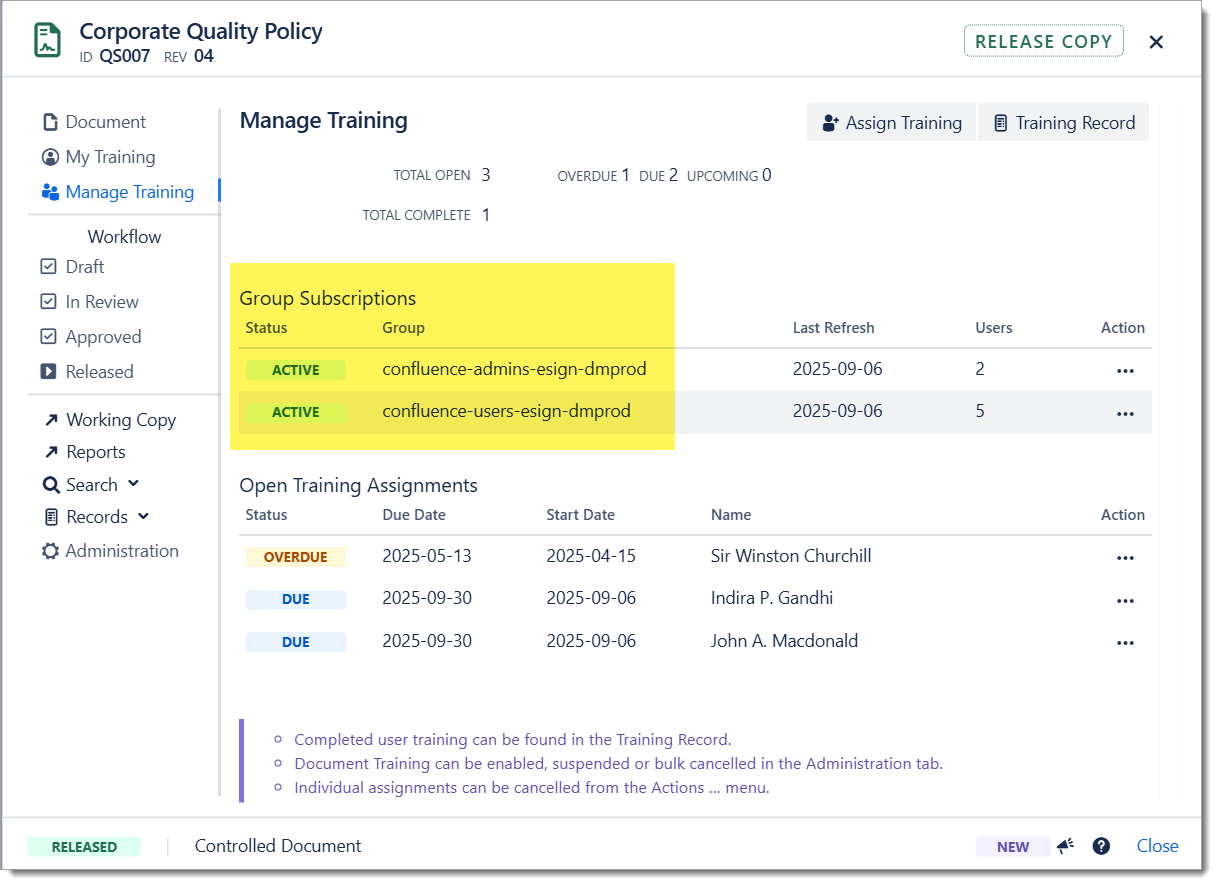
Notes
|
|
FEATURE |
Review Reminders - eSign Documents now will automatically send reminders for open (incomplete) document reviews.
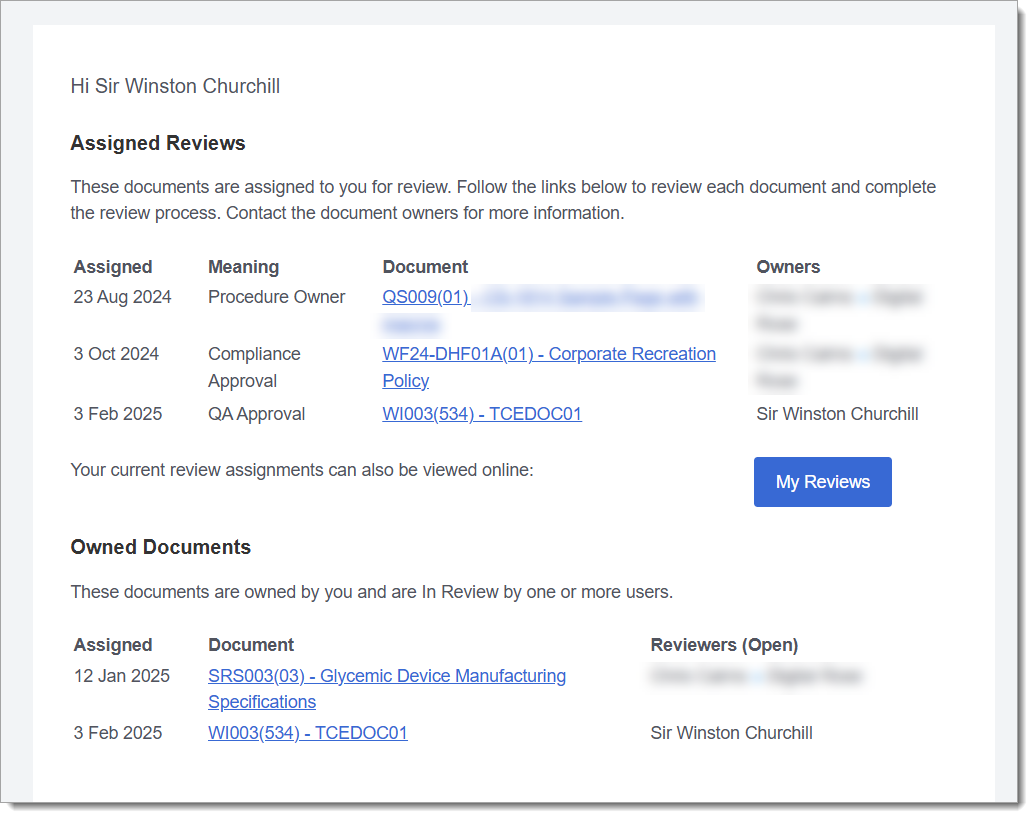
Review reminders can be enabled or disabled in App Management > eSign Document Settings 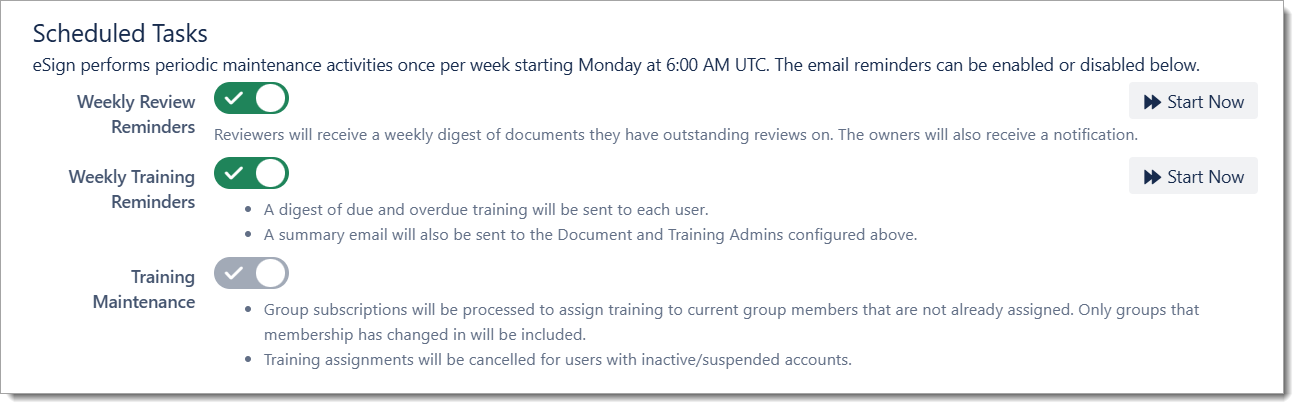
|
|
FEATURE |
Changing Document Owners As organizations evolve, different people may become responsible for existing documents. To facilitate this eSign has added the ability to easily change document owners for existing document revisions. Owners and Admins can access this from the Document tab of the Document Management panel. 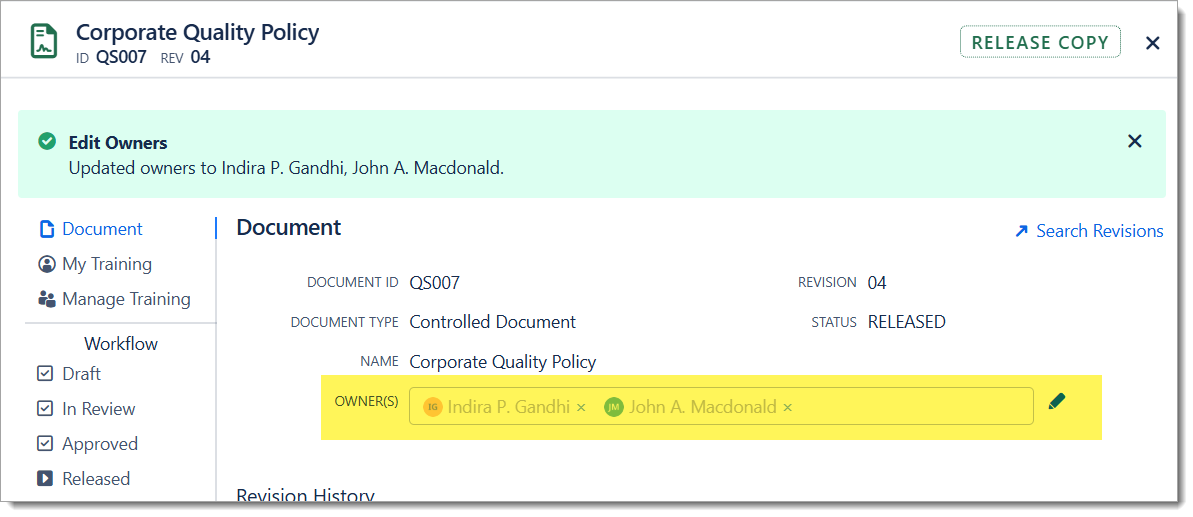
|
|
FEATURE |
Force Assign User Training In special cases, specific users may need to repeat training. To support this, there is a new option in Assign Training to override the standard schedule or existing open training. When enabled, eSign will assign the requested training even if the user has already completed it, or if the retrain interval is not yet due. Any open training will be replaced with the new training. The users will receive the standard notice email with Due Date and Training Notes. 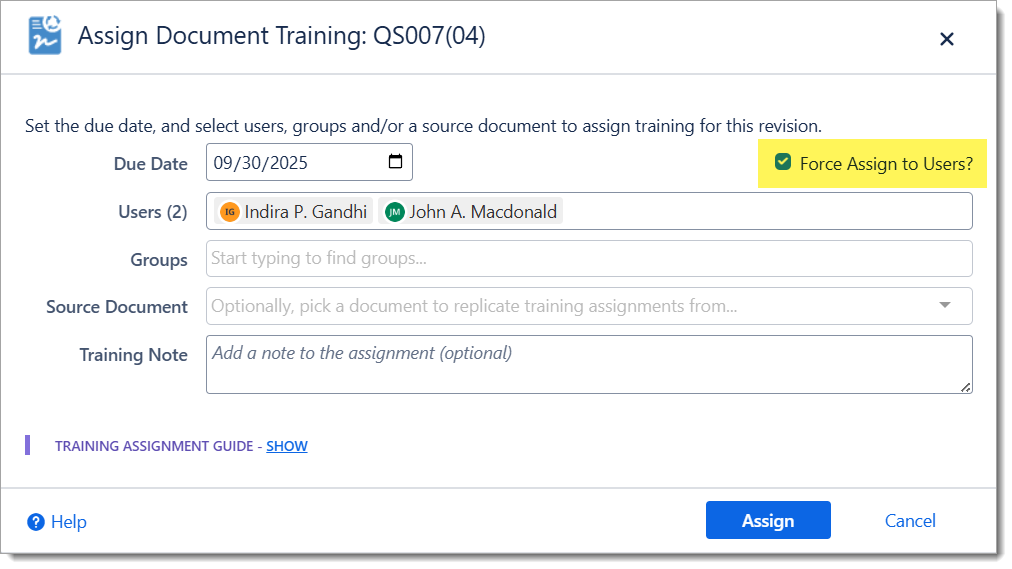
Notes
|
|
ImproveD |
The Release process was updated to search for and obsolete older revisions upon release, not only the immediately previous revision. This will help in the occasion that a revision is skipped due to administrator intervention. The Admin function to Reactivate an Obsolete revision will also verify there are no active Released revision before proceeding. |
|
UX |
As the Confluence page copy API appears to be handling large attachment volumes better, the threshold for pre-release warnings has been raised to 250 attachments and/or 250MB total file size. |
|
TECH |
Updated several internal libraries for security and performance. |
|
patch |
Workaround patch for an Atlassian API that was disabled 6 months ahead of schedule. (2025-09-30) |
2025-07 - My Reviews, My Training, and a new Training Administrator Role
|
Type |
Description |
|---|---|
|
FEATURE |
There are new My Reviews and My Training views that provide a real-time overview of any user’s personally active reviews and open training items. These pages can be viewed online and are also set up to print or save to PDF. The new views can be found in the Atlassian user account menu (My Document Reviews, My Document Training) and from the eSign Reports application menu. 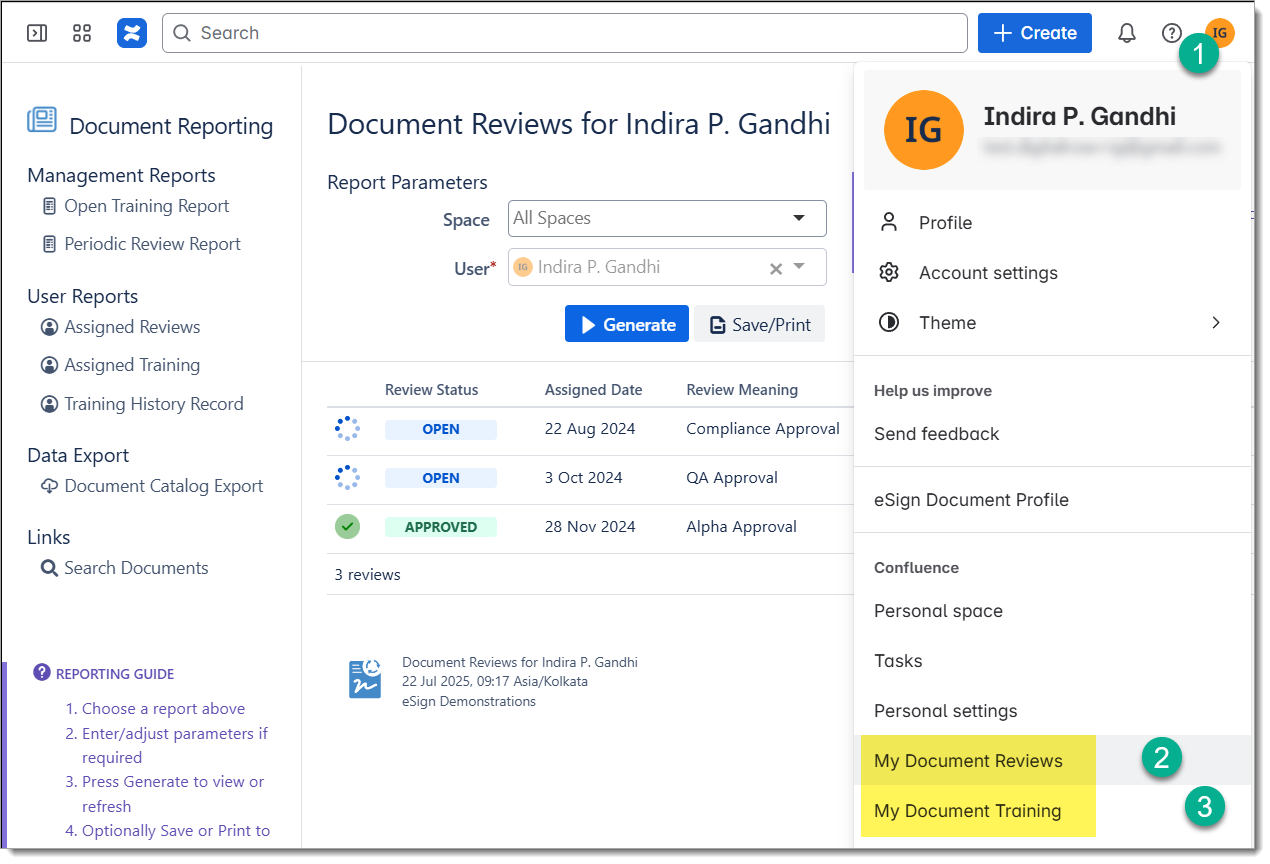
Administrators can also use these reports to pull up Review and Training status for other users within the site. |
|
FEATURE |
eSign Documents has introduced a Training Administrator role. Users assigned this role can assign, report on and manage training assignments across the Confluence site. This role is intended for customer organizations who have a separate group responsible for training management that are not part of document control. These administrators will not have full Document Administrator rights; they can not release or administer documents beyond training scope. Configure the Training Administrators (users) in eSign App Settings. |
|
IMPROVED |
Site-wide Document Administrators can now be configured (by user) in eSign App Settings. This is an addition to the existing Document Administrator (group) configuration at the space level. |
|
IMPROVED |
The eSign Reports have received improved look and feel to accompany the new My Reviews ad My Training reports. The PDF export has a more refined report header and page footer. |
|
IMPROVED |
The User Training History Report also received some visual updates and now allows a reporting date range to be specified. By default it shows user training records for the last year. |
|
FIX |
Correct security issue where space-assigned document admins did not inherit training management privileges. (2025-07-25) |
2025-06 - Technical and Security Updates
|
Type |
Description |
|---|---|
|
TECH |
Updated several internal libraries for security and performance. |
|
TECH |
User and document search picklist limits were extended to accommodate sites with hundreds of documents. |
|
FIX |
Fixed an intermittent “page load failed” issue on the reports selection page. |
|
FIX |
My Documents search page occasionally would not find all expected documents due to Confluence index issues. Applied workaround to use local page search and bypass indexes. |
|
UX |
For clarity, the New Revision button has been hidden from the Document Management dialog for Release Copies. Previously it was disabled and never active as new revisions are always started from the Working Copy. (2025-06-27) |
|
FIX |
Update the weekly reminders task to be able to detect and cancel assigned training for ex-users (unlicensed) on sites that allowed public access. (2025-06-27) |
|
FIX |
Updated the Document Link macro document search to allow document ID’s containing dashes (-) to be located as the default Confluence search does not index dashes. (2025-06-27) |
2025-04 - Review visibility and selective access by Space
|
Type |
Description |
|---|---|
|
IMPROVED |
Improved visibility of Rejected Reviews.
|
|
FEATURE |
Allow eSign Documents to be enabled for only specific spaces. The app by default is available on all spaces. Now there is an option to hide the Documents page byline and menu items by default and only enable those in certain spaces. Access the site wide option in eSign App Settings, and then enable spaces in eSign Space Settings. Note that pages that contain document metadata will always display the eSign Documents byline information, even if the app is not displayed in a space. |
|
improved |
The eSign Document Search macro’s predefined views (Approval, Release, and Training) can now have the sort order customized. |
|
FIX |
Fix issue where User Training entries were not always copied to the individual User History report. The Administration > Reindex action can be used to re-copy missing entries. |
|
FIX |
Correct issue where errors were displayed in the release log due to permission limitations in Confluence Free Edition sites. |
|
UX |
The manage document dialog size was increased and the inline feedback messages will stay visible until dismissed. |
|
DOC |
New Security Matrix page available to clarify access rights by user role. |
|
TECH |
Security and Technical updates for external libraries. |
|
FIX |
Resolved issue where documents with double-quotes within the page title would fail release pre-check (2025-04-07) |
|
FIX |
Resolve issue in settings cache that prevented the latest app settings from being retrieved (2025-04-22) |
|
FIX |
Resolve Guest user permissions to allow access to My Documents and Document Search view (2025-05-03) |
|
TECH |
Update CSP rule required due to Atlassian hostname changes (2025-05-17) |
2025-03 - Moving Released Documents and Folder Support
|
Type |
Description |
|---|---|
|
FEATURE |
Confluence Folder Support - Documents are now able to be organized in Confluence Folders. Release Copies can be published to Folders in local or remote spaces. Both Named Location and Mirror mode are supported. Notes:
|
|
FEATURE |
Move Released Documents - Release Copies are locked on release to prevent users from inadvertently editing them. In Confluence, edit and move is a single privilege, so that also prevents users and administrators from moving released documents. To make it easier to move released documents, eSign has added 2 new Administrative actions accessible to owners and admins: #1 Move Document (Action) This action will grant access for the current owner/admin user to be able to move the document page. Once this action is taken, drag and drop within the Confluence tree will immediately be available. The full Confluence page Move dialog can also be accessed after page refresh; this dialog allows move to any location, including across spaces. The Document metadata record, including training assignments and approval history are moved with the page. #2 Lock Document (Action) This action re-locks the document page, restricting Edit to all but the eSign App user. Use this after the move has been completed. 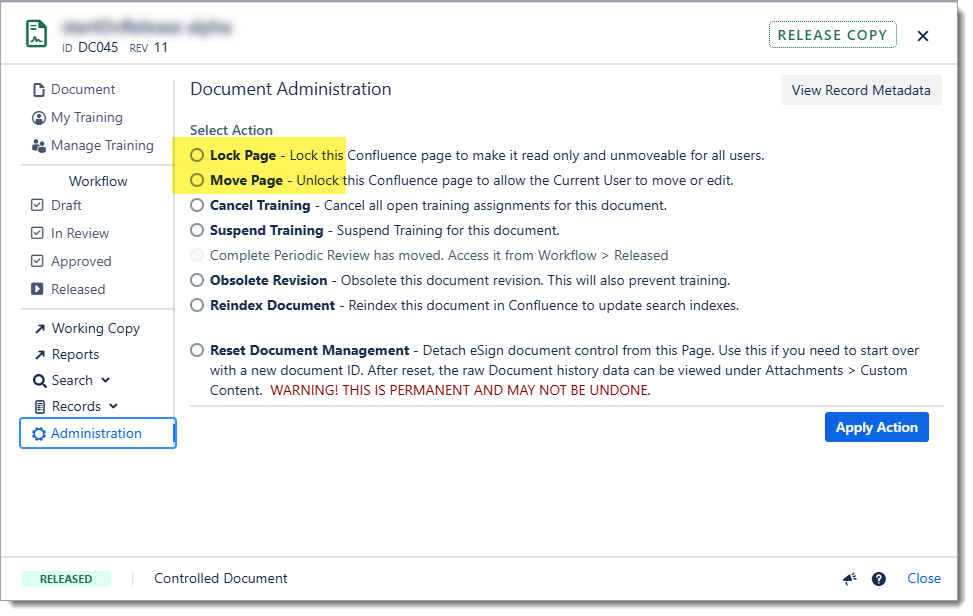
|
|
FEATURE |
Start on Release - The Document workflow has been enhanced to provide a new option to automatically start the next revision of the Document (Working Copy) upon release of the current revision. Example: when this option is enabled and SOP007 Revision 02 is released and published, eSign will immediately increment the working copy to Revision 03 (Draft). Otherwise by default the Working Copy is closed and locked upon Release. Owners can click the “New Revision” button to start the next revision at any time. 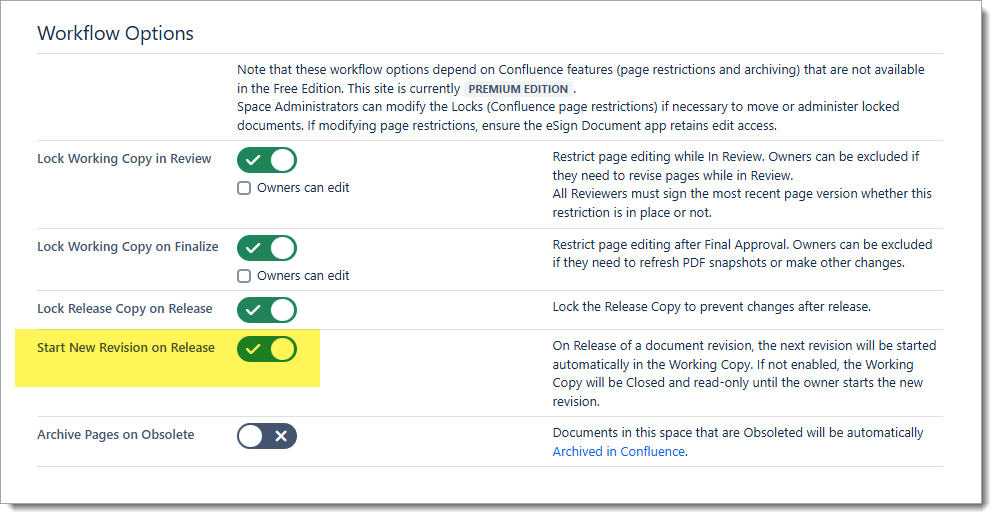
|
|
IMPROVED |
Date display has been improved for users with time zone visibility restrictions enabled. These Users will now see dates (e.g. in Reports) formatted as per the Confluence site profile. The eSign Document Profile screen has also been updated to show what eSign receives for the current user’s Timezone and Language. Notes
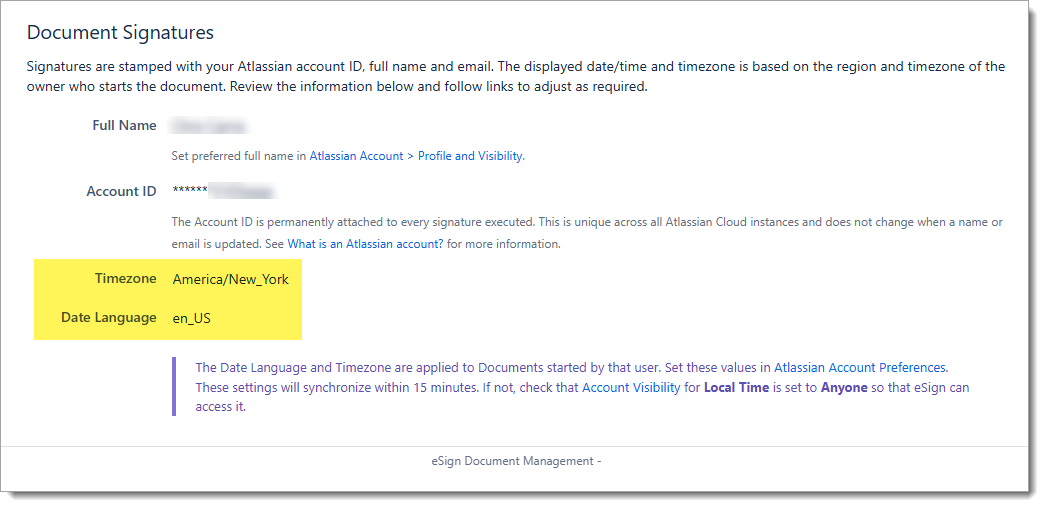
|
|
UX |
Minor user interface cosmetic changes:
|
2025-01 - Lock Working Copy in Review and ISO Date Format Support
|
Type |
Description |
|---|---|
|
FEATURE |
Lock Working Copy In Review - This new (optional) workflow mode permits the documents to be read-only during the review stage.
Additionally it is now configurable if the document owners should retain the edit privilege while locked. 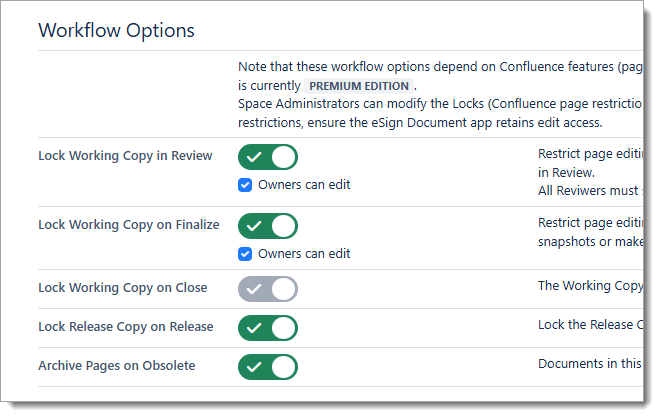
|
|
IMPROVED |
Document Dates in ISO Format - Document dates and time formats can now be configured to use an ISO date format (e.g. 2025-01-15 18:45). If enabled, this setting will apply going forward to newly started documents and revisions. Existing (released) documents will not be affected. On page macros, document records and the PDF approval record will all use this format. If not enabled (default), the existing standard format based on the Confluence account (of the user that starts the document) will apply. 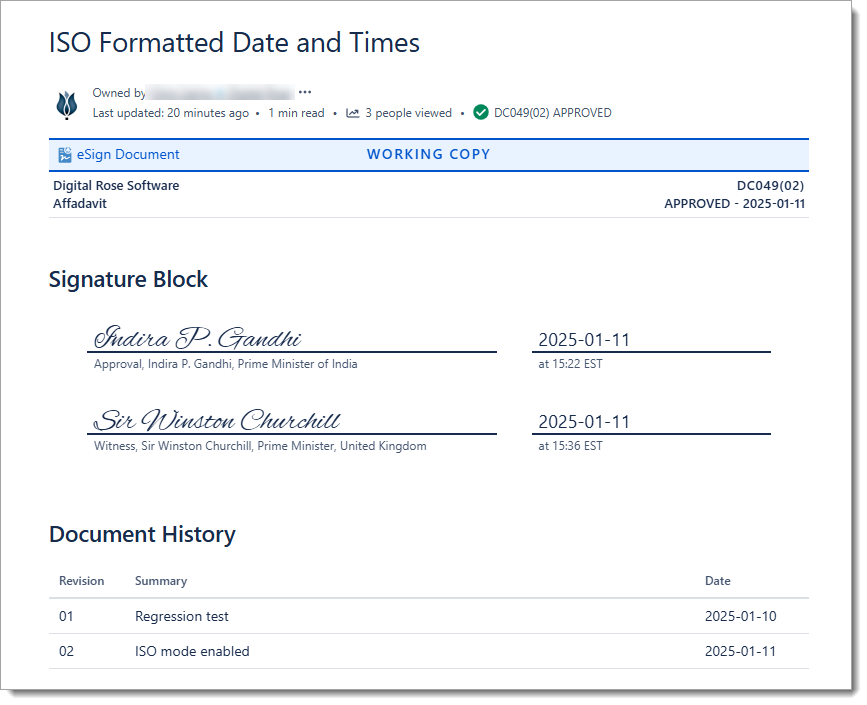
Configure this setting in eSign App Settings. 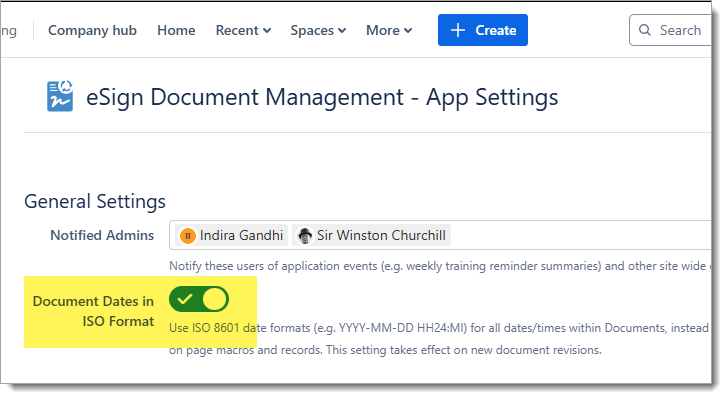
|
|
UX |
Confirmation messages (e.g. Signature Completed, Training Assigned, Action Completed) are now displayed within the document dialog for improved visibility. 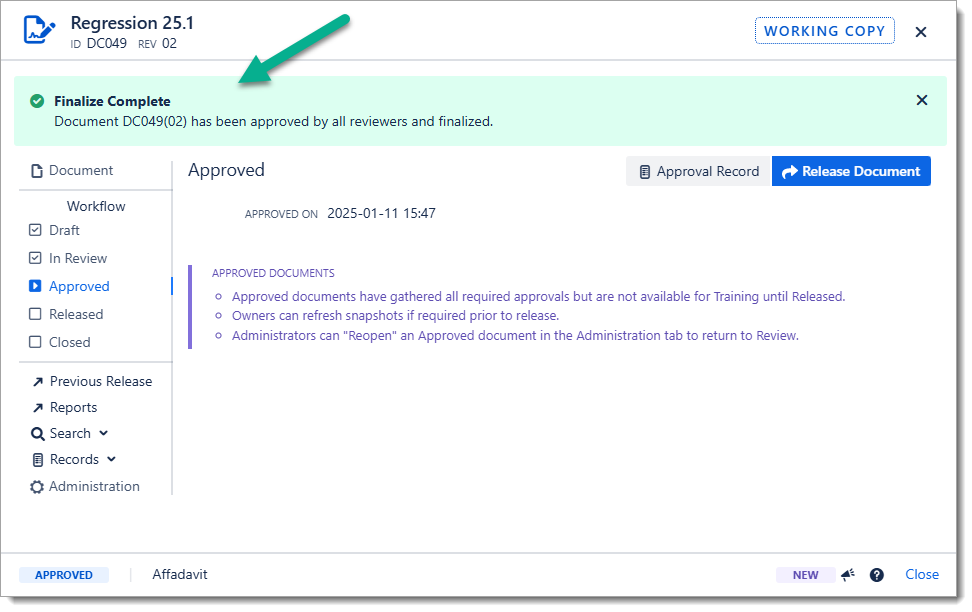
|
|
UX |
The Revision Summary is now a required field as part of the Assign Reviewers action that starts the review process. 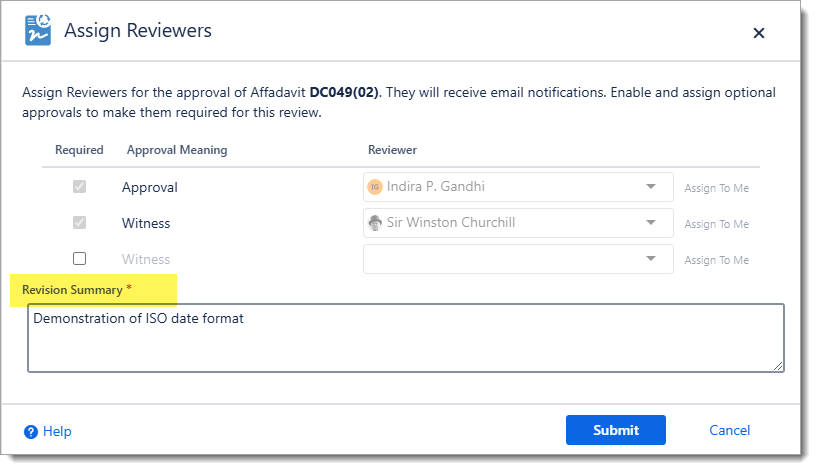
This change will help ensure that a meaningful summary is provided for the reviewers and the document history macro. This field can be updated at any time during the review process by revisiting the Assign Reviewers page. If there is no summary information, enter “N/A”. |
|
IMPROVED |
User Title can now be set as a required during Signature Execution. EAs before, eSign will automatically save and pre-populate the last used title for each user. Enable this option in eSign App Settings. 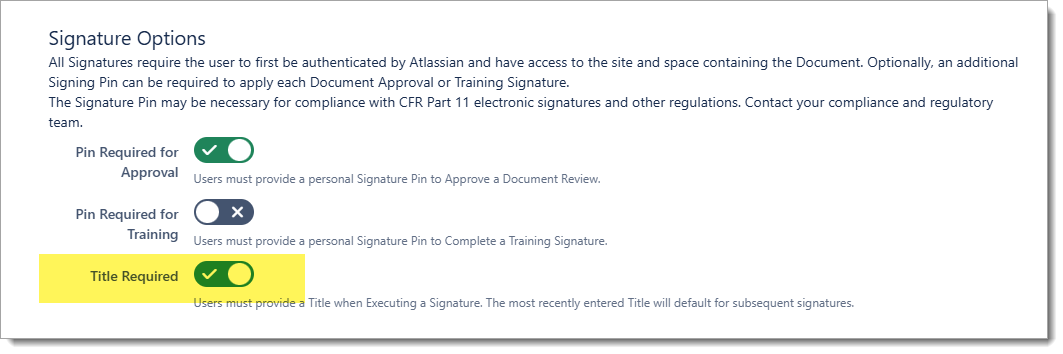
|
|
ADMIN |
eSign Space Settings configuration page now provides a Space picklist for choosing the Target Release Space. This will make it easier to select a valid space for release, instead of having to manually look up the space key. |
|
TECH |
Technical updates for several internal API’s. |
|
DOC |
A new standardized End User License Agreement (EULA) has been adopted.
|
|
patch |
Fix issue with console logger compatibility with Firefox browser. (2025-01-21 ) |
|
TECH |
Added support for the new Atlassian Automation URL pattern and auth token required for webhook triggered rules. See Update on Incoming Webhooks Trigger for Atlassian ... - Atlassian Community for more information on the recent change. Configure the webhook URL and auth tokens in eSign Space Settings. (2025-01-29) |
History
Historical change logs are available.