
Sept 13, 2026 - eSign on Forge release (v3) is now GA (General Availability) following a successful 90 day Early Access period. It is a recommended upgrade for all customeres from your Atlassian App Management console.
Existing production customers are encouraged to test the upgrade in a test environment first as it is not possible to roll back an the upgrade once completed.
The Atlassian Marketplace and Developer ecosystem is evolving from Connect Apps to Forge Apps. To align with Atlassian guidance and receive the benefits of improved support, reliability and security, eSign for Jira is migrating to the Forge platform in 2026.
What this means to existing eSign Customers and Users:
-
The overall signature experience and data are unchanged; eSign is providing the same features you are used to.
-
The signature data storage is not changing. All of your data will continue to be stored within your Atlassian Jira cloud site.
-
eSign on Forge will be initially released as “opt-in”; your site will not receive the update until the Jira Administrator updates the eSign app.
-
Because it is a foundational platform and technology change, we recommend that you test to ensure that your specific configuration and workflows work well, and identify where there may be some user/training impact due to the changes.
See the 2026 Change Log for all changes to eSign beyond the Forge Upgrade.
Forge Upgrade Timeline
The Forge Upgrade will proceed in phases.
|
Phase |
Description |
|---|---|
|
1. Infrastructure
|
The eSign backend service infrastructure is upgraded to support Forge platform technology. No user impact for this phase. |
|
2. Early Access
|
The new version will be released for optional update. Existing customers will not be automatically upgraded. This version may be installed in sandbox/test sites and updated to production on a per site basis during the Early Access phase. |
|
3. GA Release
|
Having been proved stable, eSign version 3 is now classified as GA and recommended for all customers. |
Applying the Upgrade
Upgrading the eSign Signatures for Jira from V2 to V3 can be done in the Atlassian app management portal by a Site Administrator.
Upgrade Steps
-
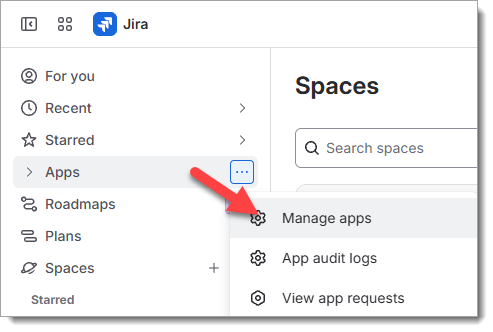
In Jira, access the Apps > … > Manage Apps menu.
-
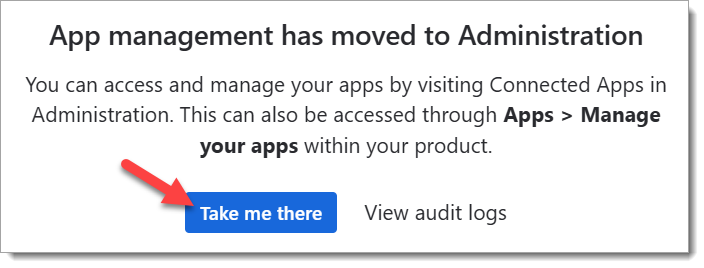
In Manage Apps, click the “Take me there” button to open Connect Apps in Administration
-
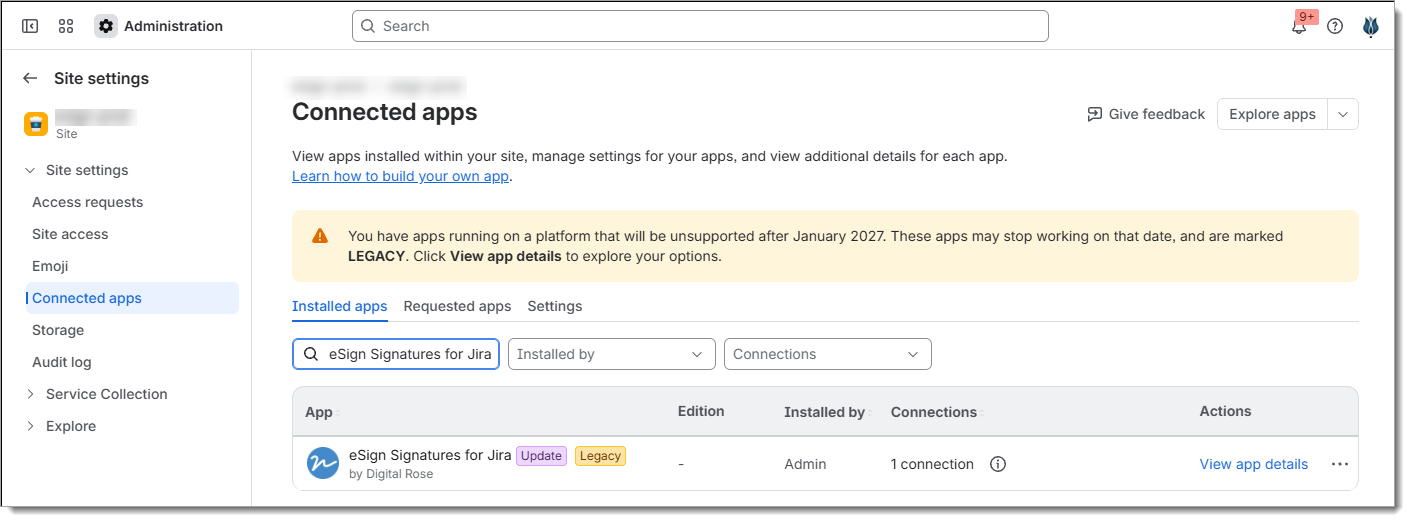
In Connected apps, enter “esign” into the search box to filter for the eSign Signatures for Jira app. Then press View app details.
-
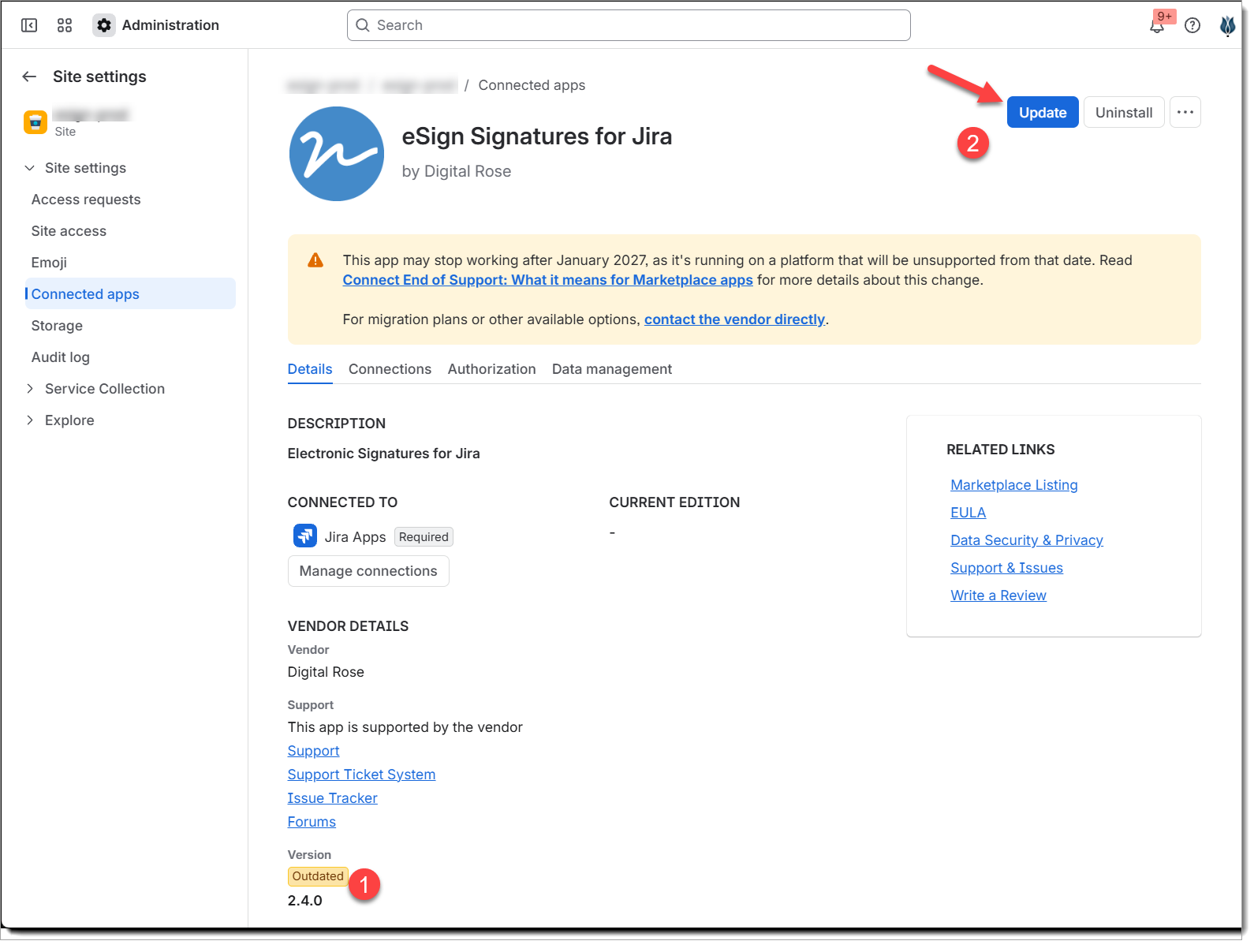
In the App Details page for eSign Documents, verify the current version is Outdated (2.X) and then press the Update button in the top right corner to move to the update screen.
-
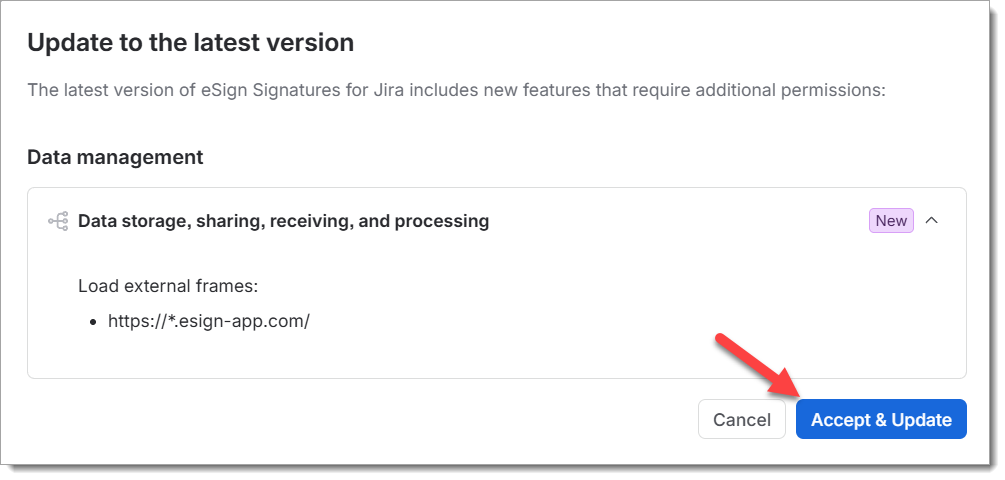
In the “Update to the last version” dialog, press Accept & Update to authorize the upgrade. After this point the site will be upgraded to Version 3 of eSign. It is not possible to revert back to Version 2.
-
Atlassian will popup an upgrade in progress notification and within a few minutes will report upgrade complete.
-
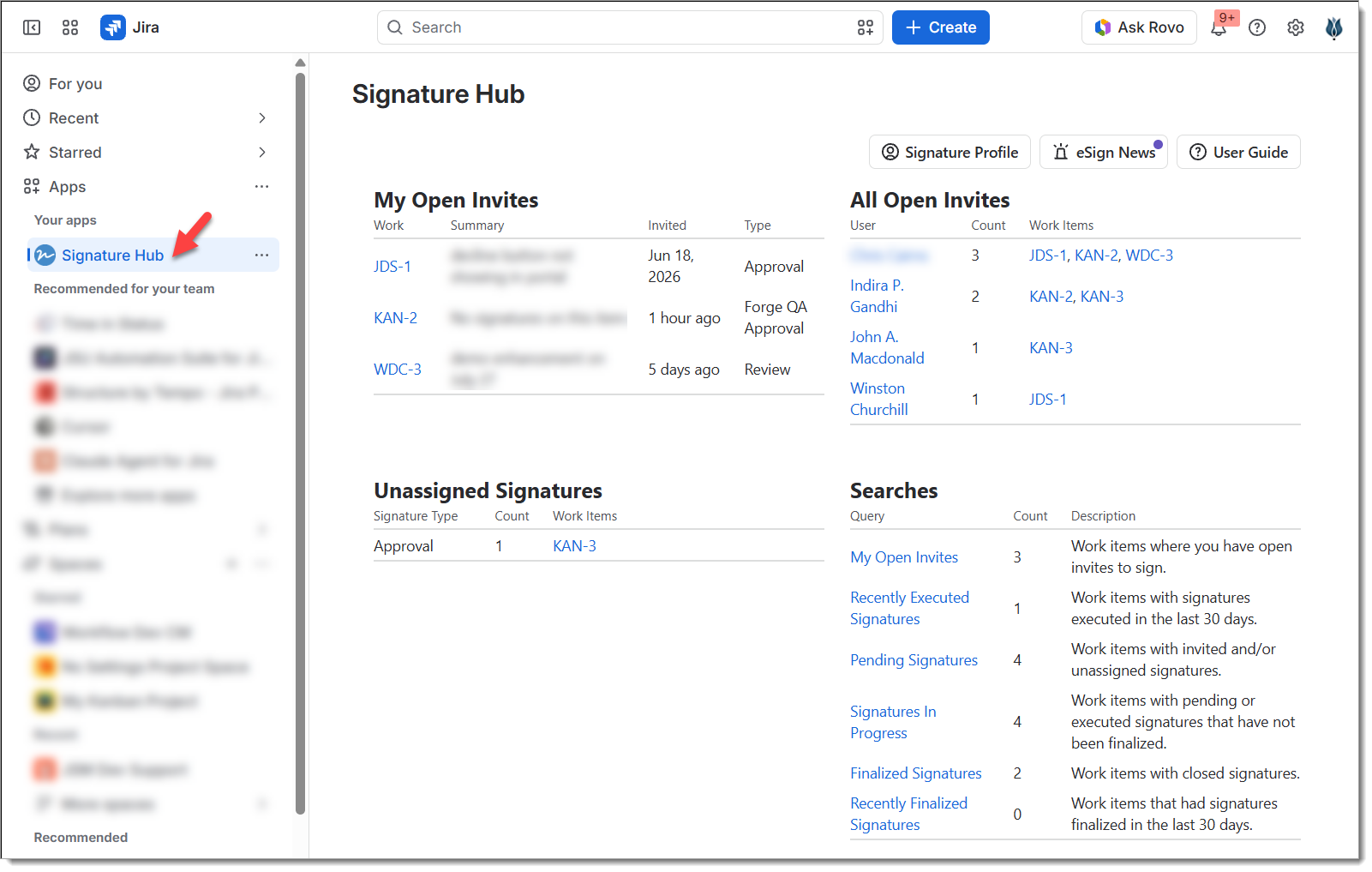
Return to Jira; there will be a new Apps > Signatures Hub menu item available. Open this to confirm V3 is installed and working.
-
Navigate to any Jira work item with existing signatures and view the upgraded Signatures panel. It has all the same capabilities and layout is very similar to the V2 panel.
Continue exploring the new version. Review the Scope of Changes section below for a full list of all impacted screens, reports and macros.
Data Migration
As this upgrade does not change any of the signature metadata stored within Jira, no data needs to be migrated.
Scope of Changes
This section highlights the various eSign user accessible features and any functional impacts of the forge upgrade. This list may be useful in reviewing your team's usage of eSign and identifying the use cases to validate with your configuration.
All eSign screens and dialogs have been converted to the new Forge technology; there will be minor cosmetic changes to field and screens.
|
Feature / Page |
Impact |
What’s Changed |
|---|---|---|
Signature Process
|
|
|
|
Signature Panel (Work Items) |
Low |
Signature date and times are shown in the current user’s time zone The panel will display for all work items in Spaces with Signatures enabled |
|
Execute Signature |
no change |
|
|
Invite to Sign |
Low |
Pending checkbox renamed to Unassigned |
|
Decline to Sign |
no change |
|
|
Finalize (and Archive) |
Low |
Preview link for the PDF signature archive is not available |
|
Verification Report |
no change |
|
|
Signature Admin |
no change |
|
|
Signature Audit (tab) |
no change |
|
Signature Management
|
||
|
Signature Hub |
Low |
The new Signature Hub is available under the global Apps menu. It provides a dashboard of signature rollup information, plus links to the user Signature Profile, eSign News and User Guide. |
|
Signature Profile |
Low |
The Signature Profile page can be reached from the Signature Hub, Signature Panel, the Service Request Management portal, and the Jira Personal Settings > General Settings. The Signature Profile is not accessible from the Jira User Profile menu as that is not supported by Forge. |
|
|
|
|
Jira Service Management
|
||
|
Service Request Signatures (Service Portal) |
Low |
The Signatures panel is now displayed below the Activity section of the Service Portal. Atlassian Forge does not support the previous location (above the Activity section). This release also includes optional enhancements to support Customer Signature Pins and Decline to Sign in the portal. See the change log for more details. |
|
|
|
|
Bulk Operations
|
|
|
|
Bulk Execute |
no change |
|
|
Bulk Invite |
no change |
|
|
Bulk Verify |
no change |
|
|
Export Certificates |
Low |
Direct export from the Jira search request view is not supported on Forge. The same report is available from Bulk Signature Operations using Bulk Verify. |
|
|
|
|
Administration
|
|
|
|
Space Settings |
Low |
Space configuration is now in Space Settings > Apps > eSign Electronic Signatures. |
|
App Administration |
Low |
Site administration is now under “eSign Electronic Signatures” within Jira > Apps > Manage Apps. For Administrators, the Apps > Signature Hub > … > App Settings provides a shortcut to access eSign App Administration. |
|
App Settings |
Low |
API Token management has been moved to its own page. Additional Customer Pin settings available |
|
API Tokens |
Low |
|
|
Administration Audit |
no change |
|
|
Quick Start |
no change |
|
|
Import Signatures |
no change |
|
|
Transfer Signatures |
Low |
No functional changes. The page renamed from Copy to Transfer Signatures to align with Atlassian data transfer terminology. |
|
|
|
|
Workflow Automation
|
||
|
Current User Signee Rule (Validator) |
no change |
|
|
Required Signatures Rule (Validator) |
no change |
|
|
Create Pending Unassigned Action (Post Function) |
no change |
|
|
Invite Signatures Action (Post Function) |
no change |
|
|
Finalize Signatures Action (Post Function) |
no change |
|
|
Reopen Signatures Action (Post Function) |
no change |
|
|
Admin Action (Post Function) |
no change |
|
|
|
|
|
Additional Items
|
|
|
|
eSign Custom Fields |
MEDIUM |
All custom eSign read-only fields will transition to Forge automatically: Signature Export, Signatures Finalized, Signature Pending, Signed On, Signature Count, Signed By, Signature Status Count Atlassian Jira performs the transition of these fields to Forge as a background task. Depending on the size of the site and number of signed issues it may take several hours after the upgrade before the fields are fully searchable. |
|
eSign Space Permissions |
no change |
There are no changes to fine-grained permissions used with Advanced Security. Existing grants will transition to the Forge version of these permissions automatically: eSign Execute, eSign Finalize, eSign Invite, eSign Manage, eSign Administer |
|
External API |
no change |
|
|
Jira Mobile App Support |
HIGH |
Atlassian Forge does not yet support the Jira Mobile App. Because of that, eSign will not be available within Jira Mobile.
|
References
For more information about the Atlassian Forge platform and transition, see: