
Problem
During eSign Document Management activities, users may see an message M3007 inside that mentions Restrictions and error code 403. This error means the App is not allowed to apply security controls to the Confluence pages under control.
References: T3007
Cause
In 2026 Atlassian began rolling out changes to Confluence Space security as part of the transition to Role Based Security. As part of this change the Restrictions permission was segregated out and is no longer included as part of Admin access.
The eSign Document app account (eSign Document QMS and Training) will automatically receive Admin access on install. Historically that was sufficient to allow page security restrictions to be applied. In parallel, Atlassian enabled the Restrictions permission to the default Confluence group (confluence-users) for most new spaces. As the app account is in this group, this should keep eDoc working normally.
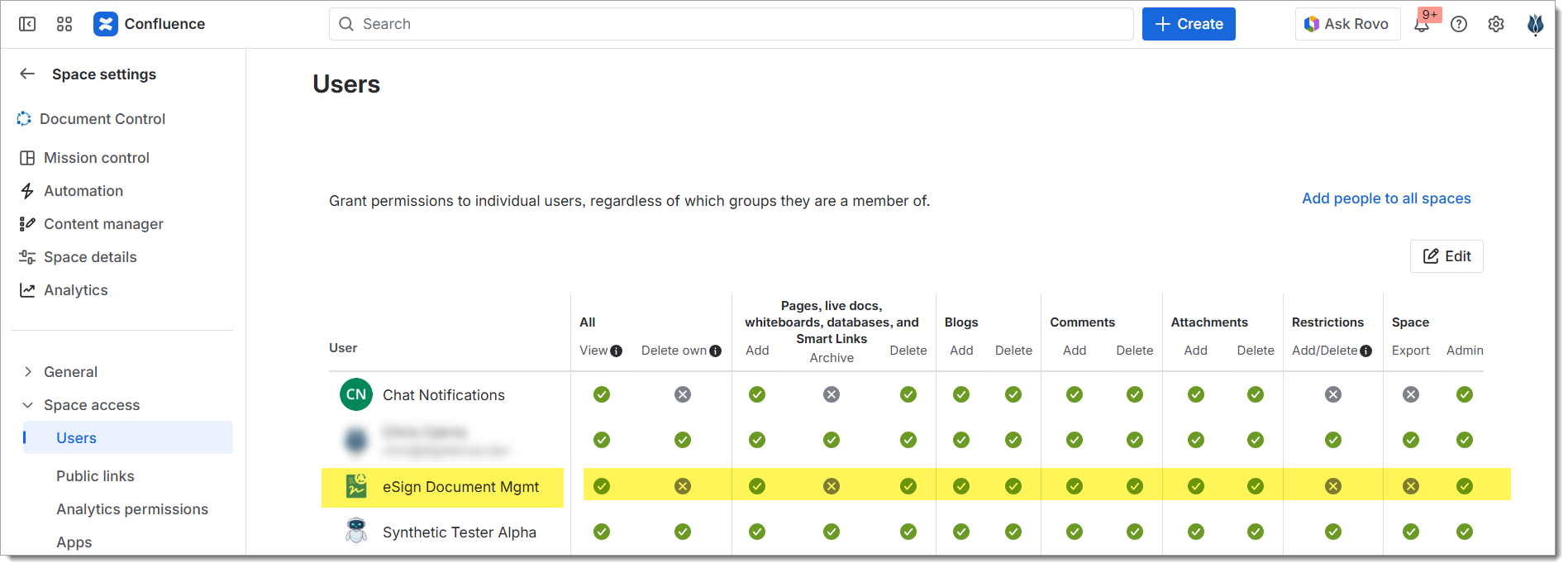
We have had a number of customers with existing sites spontaneously lose restrictions access in
some sites when this unadvertised rollout happens.
Resolution
If your team starts seeing this 403 problem on Page Restrictions. Do one of the following to restore normal operation in each of the affected spaces:
-
Under Space Access > Teams and Groups, grant the Restrictions permission to the confluence-users group (or an alternate group that contains the eSign app account).
-
Under Space Access > Users, grant the Restrictions permission directly to the eSign Document QMS and Training account.
-
If you no longer see the Space Settings > Space Access > Users page, that usually means your site has migrated to full Role Based controls. In that case go to Space Settings > Users and verify that the eSign Document QMS and Training account has the Admin role.
Contact eSign Support if this does not resolve the issue.