
Latest News - eSign Documents on Forge was released July 8, 2026 for Early Access. It is available for upgrade from your Atlassian App Management console.
-
Version 2.X - eSign Documents on Atlassian Connect.
-
Version 3.X - eSign Documents on Atlassian Forge.
Existing production customers are encourage to test the upgrade in a sandbox environment first as it is not possible to roll back an the upgrade once completed.
Overview
The Atlassian Marketplace and Developer ecosystem is evolving from Connect Apps to Forge Apps. To align with Atlassian guidance and receive the benefits of improved support, reliability and security, eSign is migrating to the Forge platform in 2026.
What this means to existing eSign Customers and Users:
-
The overall signature experience and data are unchanged; eSign is providing the same features you are used to.
-
The document and signature data storage is not changing. All of your data will continue to be stored within your Atlassian Confluence cloud site.
-
eSign on Forge will be initially released as “opt-in”; your site will not receive the update until the Confluence Administrator updates the app.
-
Because it is a foundational platform and technology change, we recommend that existing users you test the upgrade in a non-production environment. This will help ensure that your specific configuration works, and identify where there may be some user/training impact due to the changes.
See the Change Logs for all changes to eSign beyond the Forge Upgrade.
Forge Upgrade Timeline
The Forge Upgrade will proceed in phases.
|
Phase |
Description |
|---|---|
|
1. Infrastructure
|
The eSign Documents backend service infrastructure is upgraded to support Forge platform technology. No user impact for this phase. |
|
2. Early Access
|
The new version will be released for optional update. Existing customers will not be automatically upgraded. This version may be installed in sandbox/test sites and updated to production on a per site basis during the Early Access phase. Site Upgrades to the Forge release are one-way and cannot be rolled back. We recommend testing in a sandbox or non-production environment first. Once the Early Access phase has started all new installations will be eSign Documents on Forge. |
|
3. General Availability
|
After the Forge platform has demonstrated stability it will transition to General Availability and a recommended upgrade for all customers. |
Applying the Upgrade
Upgrading the eSign Documents app from V2 to V3 can be done in the Atlassian app management portal by a Site Administrator.
Upgrade Steps
-
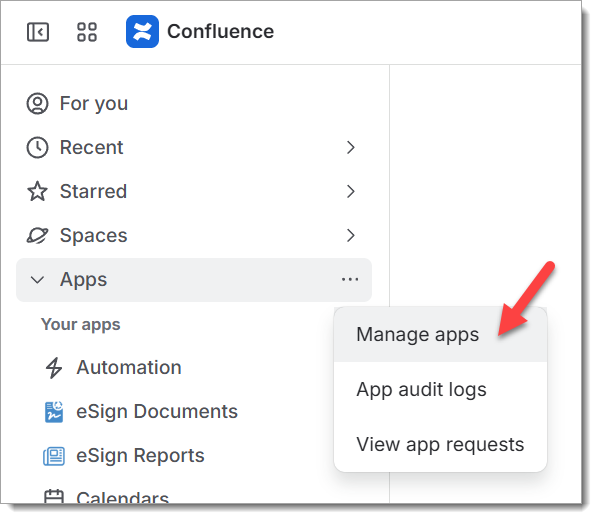
In Confluence, access the Apps > … > Manage Apps menu.
-
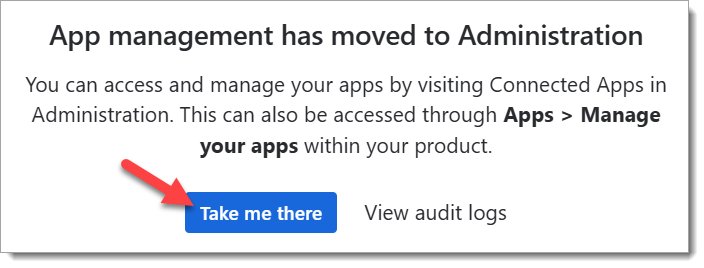
In Confluence Manage Apps, click the “Take me there” button to open Connect Apps in Administration
-
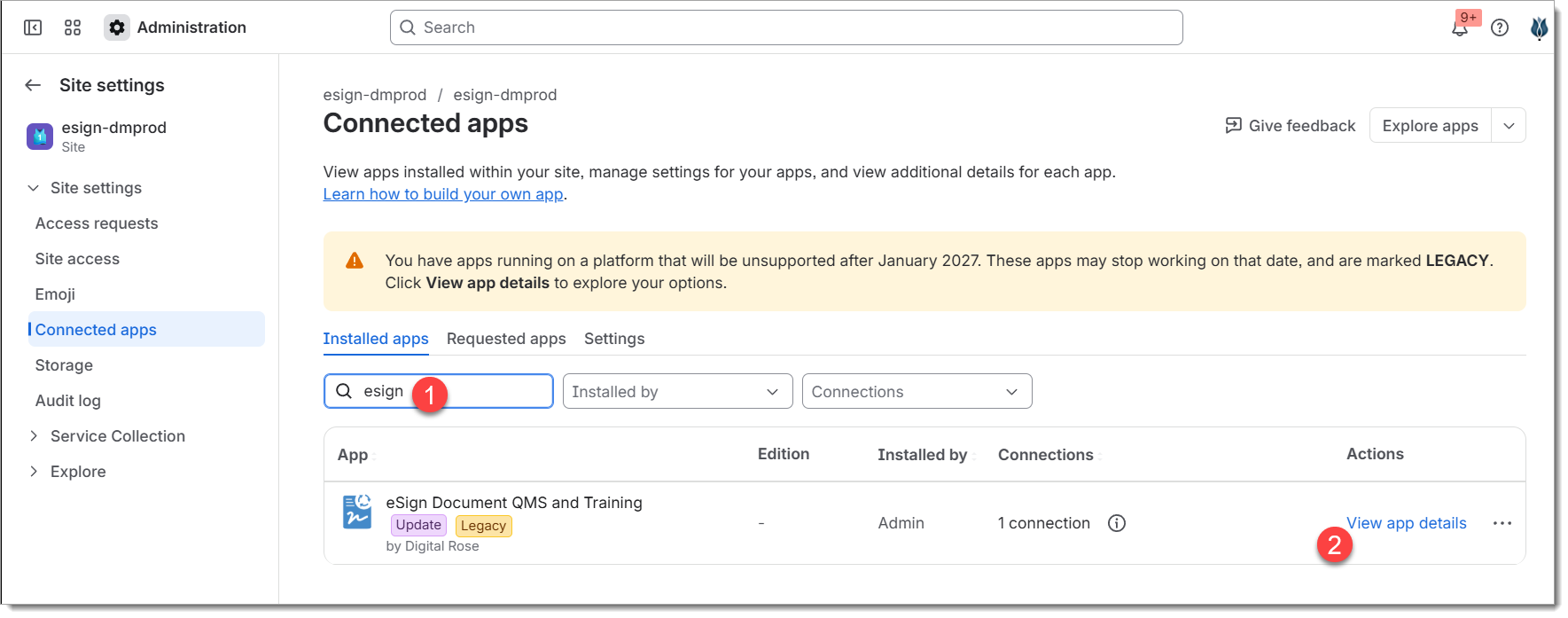
In Connected apps, enter “esign” into the search box to filter for the eSign Documents app. Then press View app details.
-
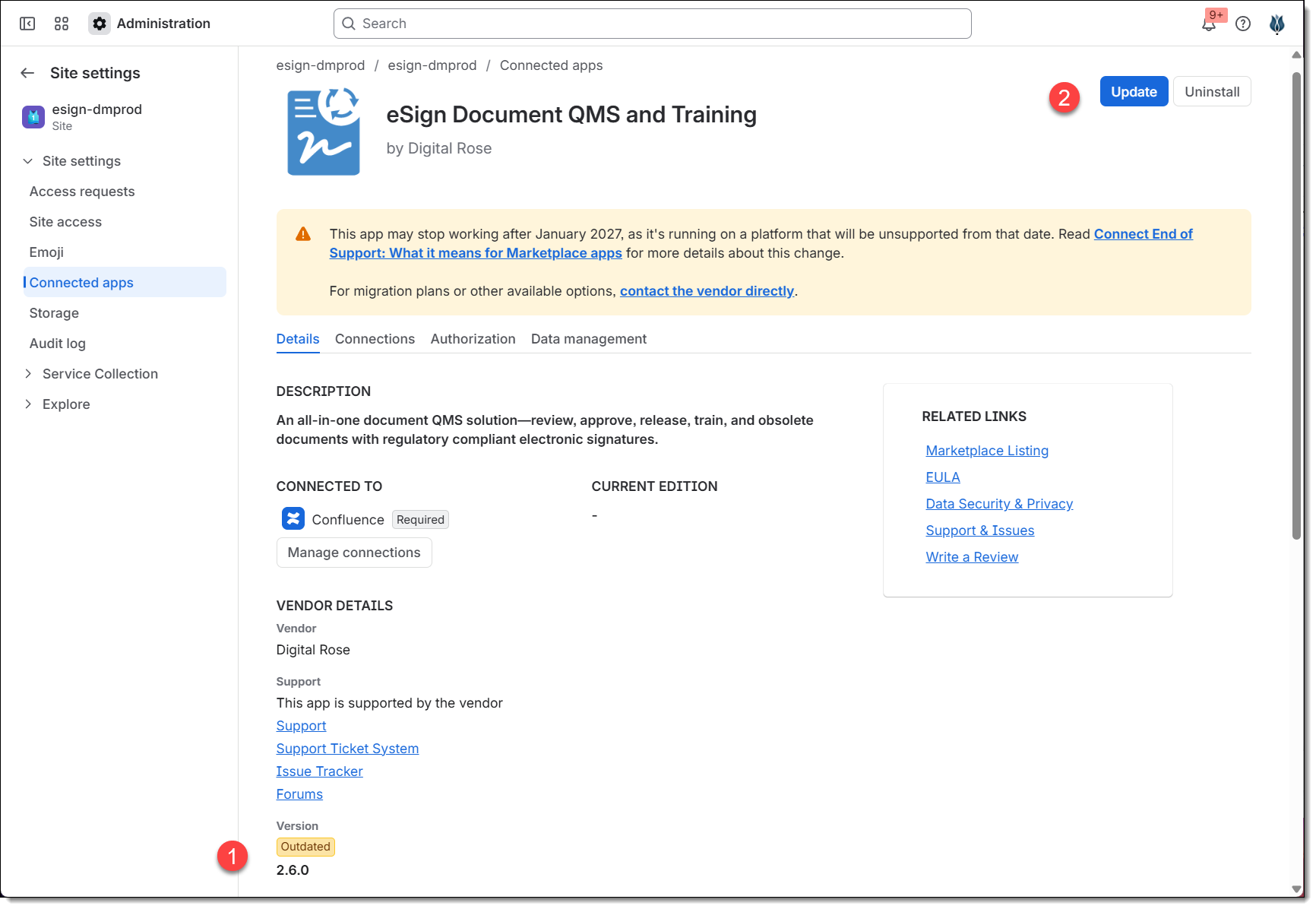
In the App Details page for eSign Documents, verify the current version is Outdated (2.X) and then press the Update button in the top right corner to move to the update screen.
-
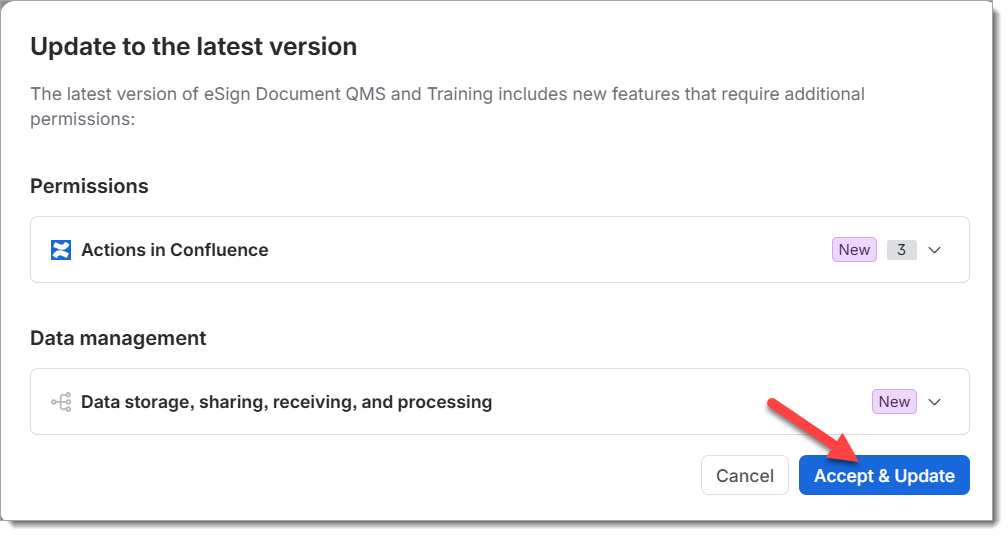
In the “Update to the last version” dialog, press Accept & Update to authorize the upgrade. After this point the site will be upgraded to Version 3 of eSign Documents and it is not possible to revert back.
-
Atlassian will popup an upgrade in progress notification and within a few minutes will report upgrade complete.
Note that Confluence does need to reindex the document metadata after the upgrade. It sometimes takes a few hours for this to happen and until complete you may notice certain reports or links do not show all the expected documents in the new version. If this persists try using the Document Admin > Reindex document to force reindex.
-
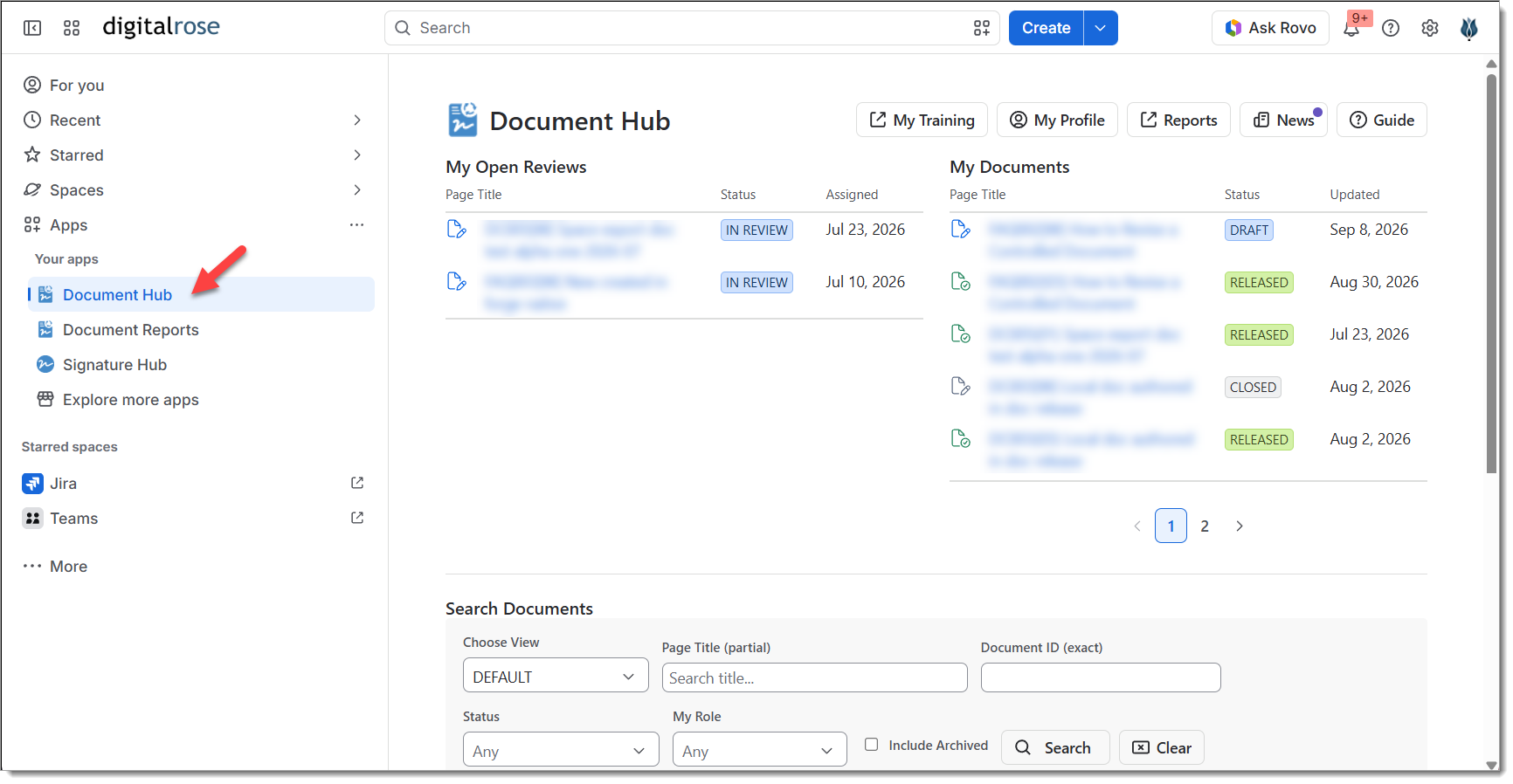
Back in Confluence - there will be a new App > Document Hub menu item available. Open this to confirm V3 is installed and working.
-
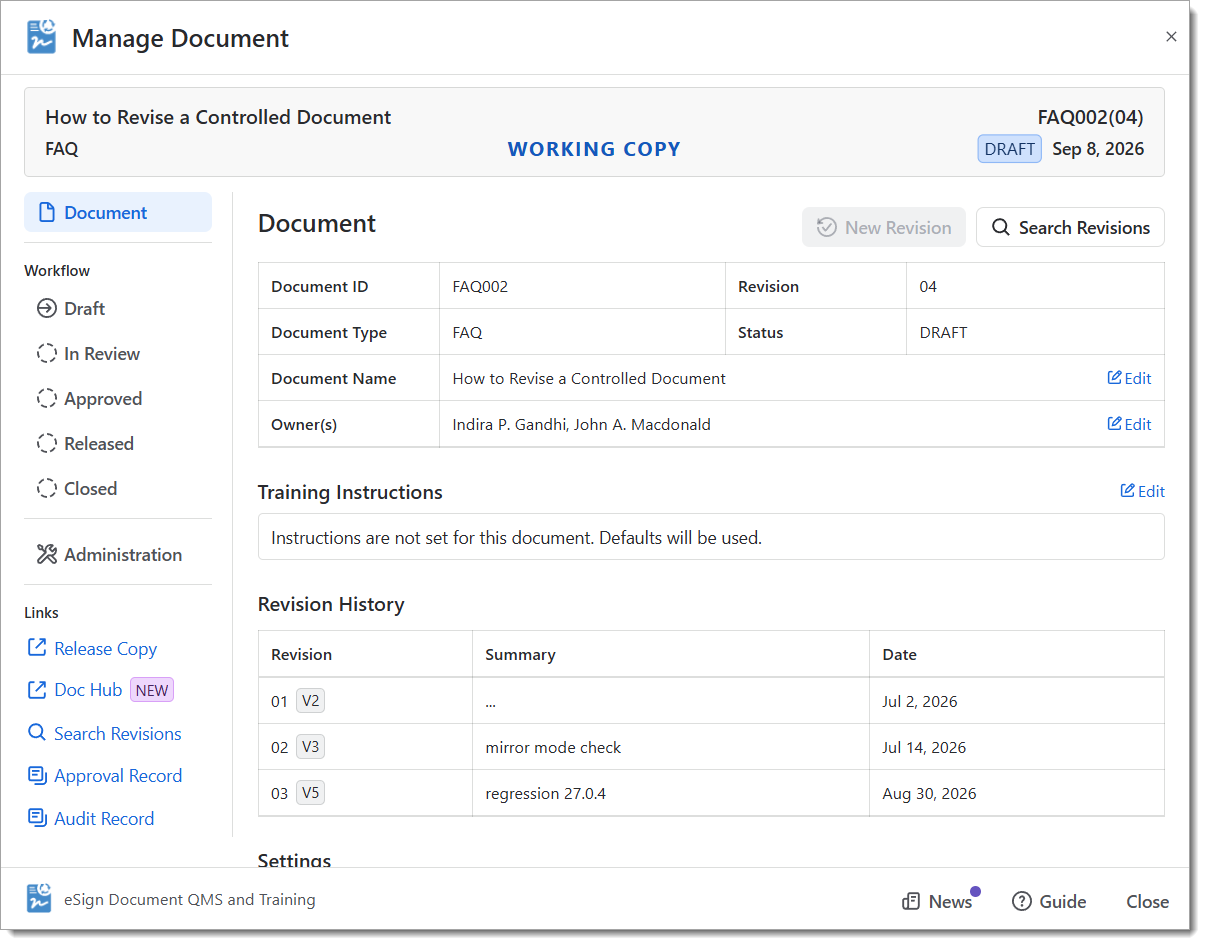
Navigate to any existing document page and click the Document byline or Header macro to open the Manage Document dialog. This has all the same capabilities and layout is very similar to the V2 dialog.
Continue exploring the new version. Review the Scope of Changes section below for a full list of all impacted screens, reports and macros.
Data Migration
As this upgrade does not change any of the document or signature metadata stored within Confluence, no data needs to be migrated.
Scope of Changes
This section highlights the various eSign user accessible features and any functional impacts of the forge upgrade. This list may be useful in reviewing your team's usage of eSign and identifying the use cases to validate with your configuration.
The impact table below highlights material changes that could impact the usage of the eSign Document application. It does not focus on minor cosmetic changes to fields and screens resulting from the conversion to to the new Forge platform.
|
Feature / Page |
Impact |
What’s Changed |
|---|---|---|
Document Control Lifecycle
|
||
|
eSign Document Byline |
no change |
|
|
Manage Documents |
Low |
All existing functionality transferred. There are changes to some field and link locations. |
|
Start Documents |
no change |
|
|
Assign Reviewers |
no change |
|
|
Approve Review |
no change |
|
|
Decline Review |
no change |
|
|
Finalize Approvals |
no change |
|
|
Release Document |
Low |
Field layout changes, and new dedicated fields for precheck results on target release page, location and space. |
|
Complete Periodic Reviews |
Low |
Periodic reviews now allows the user to more easily cancel the next periodic review by selecting Unscheduled from a new radio button. |
|
Edit Owners |
no change |
|
|
Assign Training |
no change |
|
|
Approval Record Report |
no change |
|
|
Audit Record Report |
no change |
|
|
Training Record Repot |
no change |
|
|
|
|
|
Document Macros
|
||
|
Document Header |
no change |
|
|
Document Signature Block |
no change |
|
|
Document Revision History |
no change |
|
|
Document Link |
no change |
|
|
Document Search |
no change |
|
|
Notes |
|
|
|
|
|
|
Document Overview
|
||
|
Document Hub |
MEDIUM |
The new Document Hub is available under the global Apps menu. It expands on the previous Document Search page with additional view of My Reviews and My (Owned) Documents, plus Search.
|
|
Document Hub (Space) |
Low |
The Document Hub (Space) shows the same information as the global hub localized to documents within the current space.
|
|
Document Reports |
Low |
All previous existing Document Management Reports are available in Apps > Document Reports. |
|
Document User Profile |
Low |
The User Document Profile page can be reached from the Document Hub. This page is primarily used to manually set a user’s signature pin or request a reset. The Profile is no longer accessible from the Confluence User Profile menu as that location is not supported by Forge. |
|
|
|
|
Macro Export
|
|
|
|
PDF Macro Export |
MEDIUM |
The PDF Export of macros is Improved under Forge. PDF exports of all eSign macros will now closely match what is seen on screen. |
|
MS Word Macro Export |
Low |
eSign Document macros are available for export to MS Word and Third Party (e.g. Scroll PDF) |
|
|
|
|
Administration
|
|
|
|
App Configuration - Site |
Low |
Site level configuration is located under Apps > eSign Document QMS and Training. |
|
App Configuration - Space |
Low |
Space level configuration is now in Space Settings > Apps > Document QMS and Training.
|
|
|
|
|
Scheduled Tasks
|
||
|
Review Reminders |
no change |
|
|
Periodic Review Reminders |
no change |
|
|
Training Reminders |
no change |
|
|
|
|
|
Workflow Automation
|
||
|
Webhooks |
no change |
Webhooks for all Document Mgmt Lifecycle events remain available and are configured in Space Settings > eSign Documents. |
|
|
|
|
Additional Items
|
|
|
|
eSign Document Metadata & Custom Indexing |
no change |
All custom eSign Document Metadata and indexed fields will transition to Forge automatically after upgrade. |
|
Guest Access |
HIGH |
Guest access to eSign Documents on Forge is not yet supported. We are working through some technical issues and are optimistic it will be available for the full release. |
References
For more information about the Atlassian Forge platform and transition, see: